


WhatsApp with Microsoft Dynamics 365: Options and Setup in 2026
Compare Microsoft's WhatsApp channel, third-party connectors and a custom Dynamics 365 integration. Review architecture, setup, security and buying criteria.
 Jarkko Oksanen · Co-founder & CTO
What does a WhatsApp integration with Dynamics 365 do?
Short answer: it lets agents manage WhatsApp conversations in their working environment and associate them with leads, contacts, accounts or cases. The right architecture depends on the Dynamics application, WhatsApp provider, number, consent model and automation requirements.
A useful integration does more than open a WhatsApp link from a CRM record. It preserves context, permissions, templates, delivery states and traceability.
This guide compares Microsoft’s documented channel, third-party connectors and an integration through Serviceform. Availability, features and pricing change, so verify the current provider documentation and contract for your environment.
Option 1: Microsoft’s WhatsApp channel
In September 2024, Microsoft announced a first-party WhatsApp channel for Dynamics 365 Contact Center, using Azure Communication Services.
Microsoft documents a unified agent experience and channel administration within its contact-centre architecture. Before selecting it, confirm:
- which Dynamics 365 and Azure Communication Services licences are required;
- whether your application, tenant and region are currently supported;
- how the WhatsApp number is registered or migrated;
- which Meta Business assets and permissions are needed;
- how conversations, attachments and consent records are retained;
- which Microsoft, Azure and Meta charges apply.
Do not assume a Contact Center configuration works identically in Dynamics 365 Sales, Customer Service or a custom model-driven app. Validate the exact scenario in Microsoft Learn and a test environment.
Option 2: A third-party Dynamics connector
Connectors such as WhatsApp4Dynamics by Inogic advertise messaging, templates, history and workflow capabilities for Dynamics 365.
Architectures differ. A connector may use Meta directly, a business solution provider or another communications platform. Ask each vendor to document:
- the WhatsApp access provider and ownership of the number;
- supported Dynamics applications, tables and custom records;
- where messages, files and consent evidence are stored;
- template, webhook, credential and token management;
- roles, assignment and access controls;
- support for multiple brands, business units and numbers;
- data export, deletion and exit procedures;
- all licences, messaging charges and implementation services.
A long feature list does not prove that the connector fits your data model or operating process. Request a demonstration with your own workflow and acceptance criteria.
Option 3: Serviceform WhatsApp for Dynamics 365
Serviceform offers an integration that connects WhatsApp conversations with Dynamics 365 records and workflows. Number compatibility, Dynamics application and required features are confirmed during technical assessment.
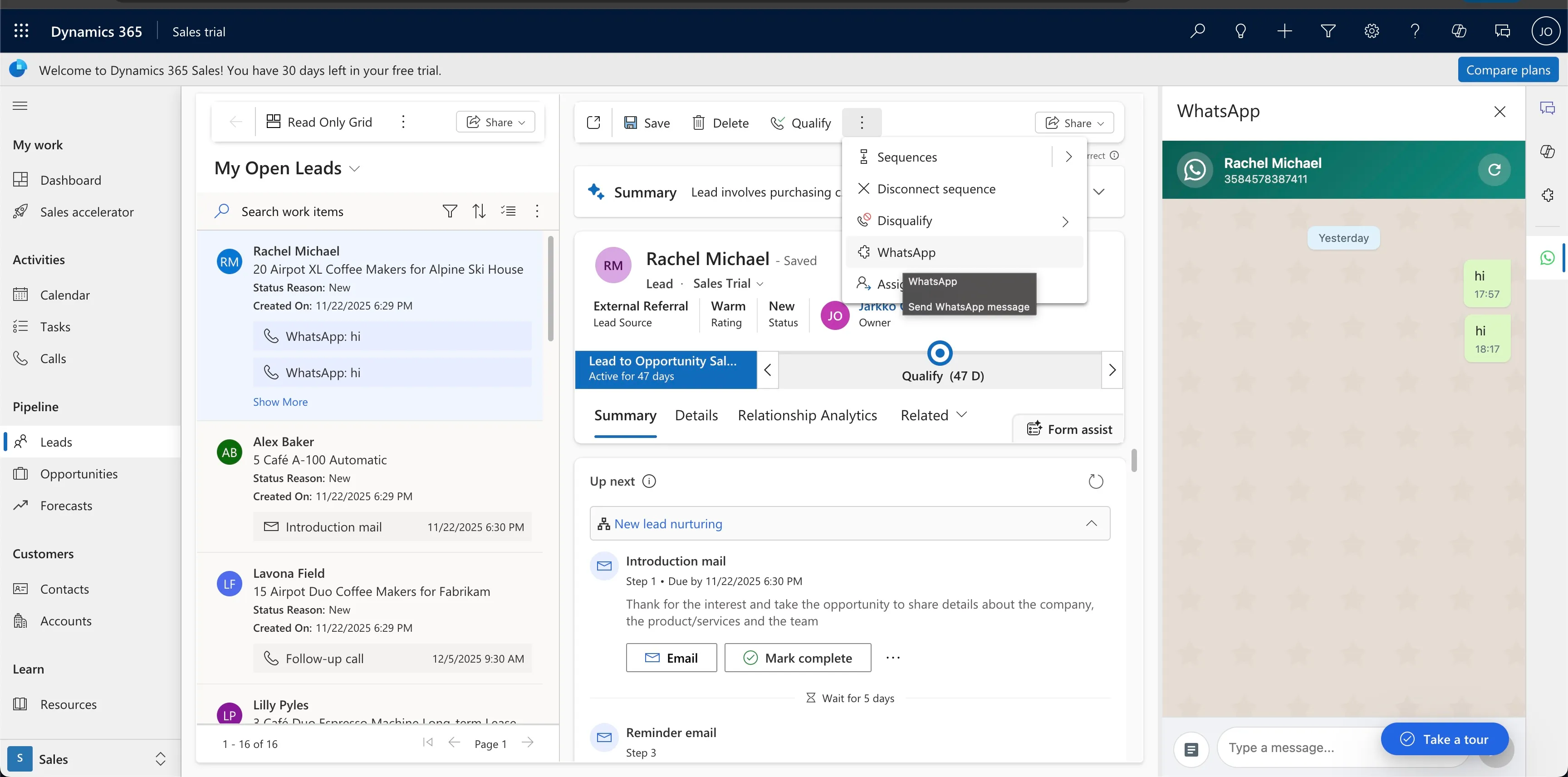
A typical agent journey is:
- The agent opens a lead, contact or account.
- The agent opens the WhatsApp conversation from the Dynamics interface.
- The panel displays the associated conversation context.
- The agent sends an allowed free-form response or an approved template.
- The integration records the configured message data or activity against the CRM record.
The exact architecture depends on the WhatsApp Business account, Dynamics environment and data requirements. Before deployment, request a data-flow diagram, dependency list and proof using your number and a non-production environment.
See Serviceform for WhatsApp for the wider channel and inbox capabilities.
Compare the options with verified answers
Build a decision matrix for your environment:
| Criterion | Question to resolve |
|---|---|
| Dynamics application | Contact Center, Customer Service, Sales or a model-driven app? |
| WhatsApp number | Can it be registered or migrated, and who retains ownership? |
| Conversation history | Where is it stored and how is it related to records? |
| Templates | Who creates, approves, synchronises and versions them? |
| Automation | Which events and actions are available to Power Automate? |
| Security | How do roles, secrets, audit and support access work? |
| Privacy | Where is data processed and how are retention and rights handled? |
| Operations | How are limits, delivery failures, webhooks and retries monitored? |
| Total cost | What do Microsoft, Meta, the connector and implementation each cost? |
Pricing pages and packages change. Use a current written proposal based on users, numbers, message categories, storage, support and implementation.
Example workflow for an education sales team
This example illustrates a flow to design and test, not a universal product configuration.
Lead creation
- A prospective student submits a permitted contact number and programme interest.
- The lead is validated and assigned.
- Dynamics 365 creates or updates the lead record.
WhatsApp contact
- The agent opens the lead in Dynamics.
- The agent selects an approved template for the intended purpose.
- The template uses controlled fields such as name and programme.
- The subsequent conversation remains associated with the lead under the agreed retention policy.
Automation
- A documented Dynamics status can request an appropriate template through Power Automate.
- Suppression rules prevent messaging after an opt-out.
- Permissions stop users from seeing another institution’s or business unit’s conversations.
- Consent, purpose and source follow the lead through the workflow.
Serviceform also works with education organisations on website lead journeys. The EU Business School case is relevant evidence for that broader journey, although it is not proof of this exact Dynamics and WhatsApp architecture. It is a Serviceform-published customer story, not an independent audit.
WhatsApp templates in a Dynamics workflow
Meta separates templates into categories such as marketing, utility and authentication. Classification, eligibility and pricing are governed by Meta’s current rules.
A Dynamics workflow can populate approved variables:
Hello {{1}},

Thank you for your interest in {{2}}.
Would you like to arrange a call with our admissions team?
Variables should be mapped to validated fields. Do not place sensitive or uncontrolled content into a template without reviewing the data flow and Meta’s rules.
Automation must also account for:
- the customer’s consent and expected purpose;
- the current messaging window;
- template approval and language;
- duplicate and retry handling;
- opt-outs and suppression;
- delivery, failure and read states where available.
Implementation plan
Step 1: Define the workflow and data
Document applications, tables, numbers, users, templates, purposes, retention and handover. Decide which data belongs in Dataverse and which remains with the messaging provider.
Step 2: Prepare environments and permissions
Use a non-production environment, least-privilege service identity and approved secret storage. Do not embed API keys in JavaScript web resources or unmanaged configuration.
Step 3: Register the WhatsApp channel
Complete business verification and number registration through the chosen provider. Confirm number ownership, WhatsApp Business Account access, templates and current charges.
Step 4: Import and configure the Dynamics solution
Import a managed solution compatible with your environment, configure connections and mappings, and review dependencies before publishing.
Step 5: Test end to end
Test incoming and outgoing messages, templates, attachments, record matching, duplicates, failures, opt-outs, permissions and recovery. The delivery timeline depends on those checks and external approvals; a fixed universal setup time would be misleading.
Security and privacy checklist
Installing a connector does not make a workflow compliant by itself. Review:
- purpose and lawful basis;
- customer notices and consent evidence;
- data minimisation;
- processor and subprocessor terms;
- hosting and international transfers;
- Dynamics and provider access roles;
- secrets and service identities;
- attachment scanning;
- retention, deletion and data-subject rights;
- logging without exposing message content unnecessarily.
Include security, privacy, Dynamics administration and the operational owner in acceptance testing.
Frequently asked questions
Which Dynamics 365 applications support WhatsApp?
Microsoft’s channel and each connector have different scopes. Confirm compatibility in writing for Contact Center, Customer Service, Sales, Customer Insights or your model-driven app, including every custom table you need.
Can I use an existing WhatsApp Business number?
It may be possible, but it depends on the number’s current status, WhatsApp Business Account and chosen architecture. Do not promise migration until the provider has reviewed those assets and the current coexistence or transfer rules.
Is the full conversation stored in Dynamics 365?
That is a design choice and product capability to verify. An integration may store messages, activities, links or summaries. Define what is retained, for how long, and how attachments, failures and deletions are handled.
Does the integration make the workflow GDPR compliant?
No. Your organisation must document purpose and lawful basis, inform people, limit access, set retention, review processors and support rights. Ask the provider for contracts, subprocessors and technical controls.
Can Power Automate send WhatsApp messages?
A connector or custom action can expose messaging operations to Power Automate. The flow must still enforce template rules, consent, suppression, permissions, retry control and logging.
How much does WhatsApp with Dynamics 365 cost?
There is no reliable universal figure. Total cost can include Dynamics licences, Azure services, Meta messaging charges, connector licences, implementation, storage and support. Ask for a current estimate using your expected numbers, users and message mix.
Official sources and related reading
Sources reviewed on 16 August 2026:
- Microsoft: first-party WhatsApp channel announcement.
- Microsoft Learn: Dynamics 365 Contact Center documentation.
- Microsoft Learn: connect a WhatsApp Business Account to Azure Communication Services.
- Meta: WhatsApp Business Platform documentation.
- European Commission: data protection in the EU.
For adjacent architecture decisions, read WhatsApp AI chatbots in 2026 and Serviceform for WhatsApp. For the example sector, see Serviceform for education and the EU Business School case.