



WhatsApp Integration for Microsoft Dynamics 365: The Complete Guide
Learn how to add WhatsApp to Microsoft Dynamics 365. Compare omnichannel options, native vs third-party integrations, and set up WhatsApp messaging for your sales team.
Why WhatsApp + Dynamics 365?
Your sales team lives in Dynamics 365. Your customers live on WhatsApp.
With 2+ billion users worldwide, WhatsApp is how people prefer to communicate – especially in Europe, Latin America, and Asia. When a lead comes in, the fastest way to reach them isn’t email. It’s WhatsApp.
But here’s the problem: switching between Dynamics and WhatsApp Business is painful. Context gets lost. Conversations aren’t logged. There’s no automation.
What if your agents could send and receive WhatsApp messages directly inside Dynamics 365?
This guide covers everything you need to know about WhatsApp integration for Microsoft Dynamics 365 – comparing Microsoft’s native option, third-party solutions like WhatsApp4Dynamics, and the simplest approach that actually works.
Option 1: Microsoft’s Native WhatsApp Channel (Azure Communication Services)
In September 2024, Microsoft announced a first-party WhatsApp channel for Dynamics 365 Contact Center, powered by Azure Communication Services.
What Microsoft Offers
- WhatsApp integration via Azure Communication Services
- No third-party connectors needed
- Unified agent interface
- Reporting for supervisors
The Problem with Microsoft’s Solution
Sounds great on paper. In practice, there are significant limitations:
1. Phone Number Registration Issues
Microsoft relies on Azure Communication Services to provision WhatsApp numbers. But here’s the catch:
- Microsoft cannot manage phone number registrations in many countries
- In Spain, for example, Meta (WhatsApp’s parent company) requires local business verification that Microsoft’s Azure process doesn’t support
- You may not be able to use your existing business phone number
- Getting a new number through Azure can take weeks or fail entirely
2. Limited to Contact Center
The native integration is specifically for Dynamics 365 Contact Center – not Dynamics 365 Sales, Customer Service standalone, or other apps. If you’re using Dynamics for sales and CRM (not contact center operations), this solution doesn’t work.
3. Complex Multi-Tenant Setup
If you’re an agency or enterprise managing multiple business units:
- One Dynamics instance serving multiple clients is complicated
- Each WhatsApp number needs separate Azure configuration
- No easy way to route messages across organizations
4. No Existing WhatsApp Account Support
Already have a WhatsApp Business account with history and verified status? You may need to start fresh with a new number through Azure.
Option 2: Third-Party Solutions (WhatsApp4Dynamics, etc.)
Several third-party vendors offer WhatsApp integrations for Dynamics 365. One popular option is WhatsApp4Dynamics by Inogic, which provides WhatsApp messaging via the WhatsApp Business API or Twilio.
What Third-Party Solutions Offer
- Chat interface inside Dynamics 365
- Message templates with variables
- Chat history and session tracking
- Workflow triggers via Power Automate
- File and media sharing
- Multi-agent support
The Challenges with Third-Party Solutions
1. Still Requires Complex API Setup
Most third-party solutions still require you to:
- Set up WhatsApp Business API directly with Meta (complex approval process)
- Or configure through Twilio (additional vendor, additional costs)
- Manage API credentials, webhooks, and token refreshes
2. Per-Seat Licensing
Many solutions charge per user, which gets expensive fast:
- 10 agents = 10 licenses
- 50 agents = 50 licenses
- Costs scale linearly with team size
3. Limited Multi-Tenant Support
If you’re managing multiple organizations or business units:
- Each requires separate configuration
- No unified view across tenants
- Complex routing rules
4. Separate Vendor Relationship
You end up managing:
- Your CRM (Microsoft)
- Your WhatsApp API provider (Meta or Twilio)
- Your integration vendor (third-party)
- Three vendors for one feature
Option 3: Serviceform WhatsApp for Dynamics 365
We built a different approach: bring your own WhatsApp Business account and connect it directly to Dynamics 365 through Serviceform.
How It Works
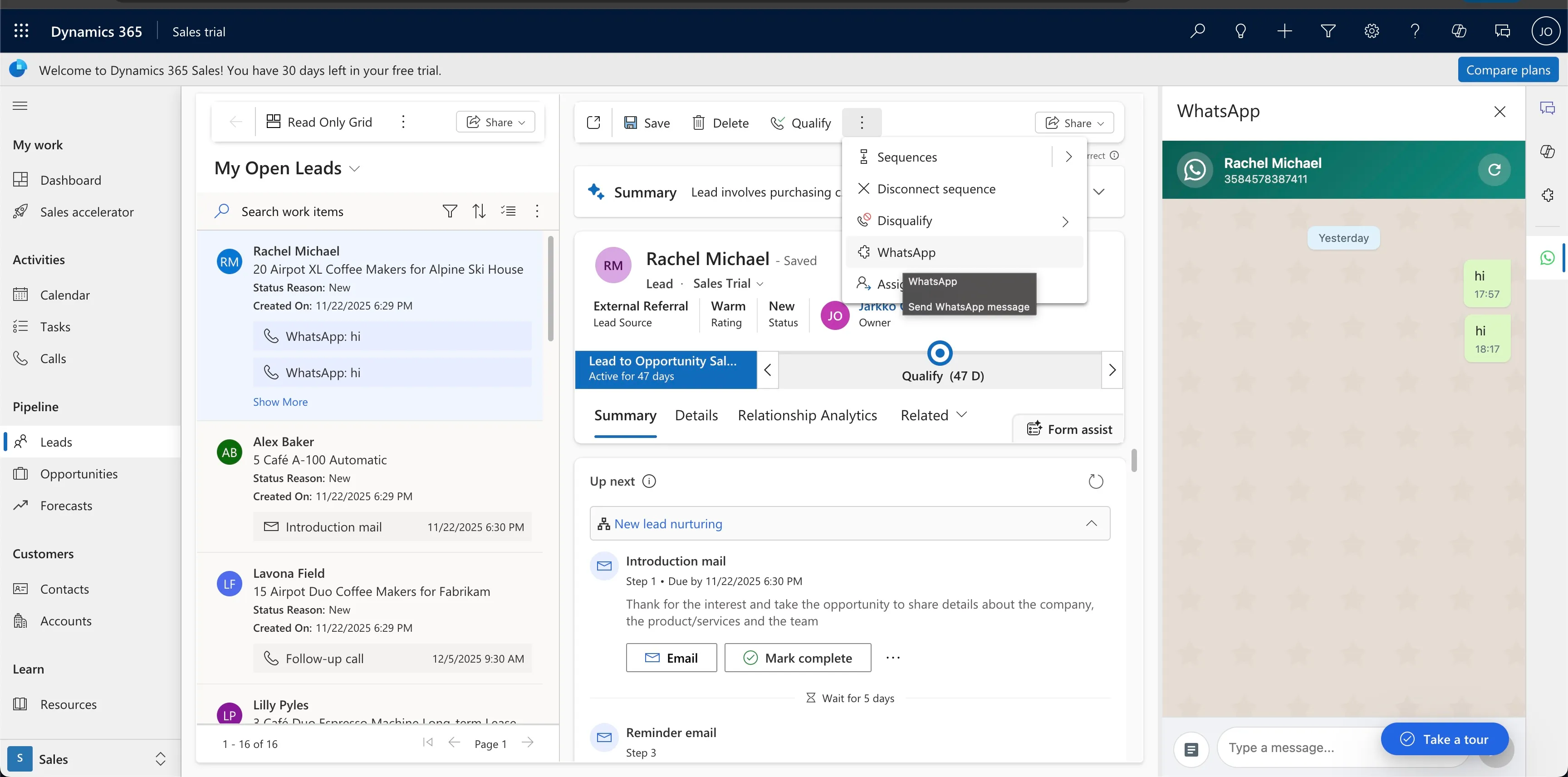
- Agent opens a Lead, Contact, or Account in Dynamics 365
- Clicks “WhatsApp” button in the command bar
- Side panel opens showing full conversation history
- Agent sends messages – either free text or approved templates
- Messages sync automatically between Serviceform and Dynamics
No Azure setup. No Twilio. No Meta API application. Works with your existing WhatsApp Business account.
Complete Feature Set
Everything you’d expect from an enterprise WhatsApp integration:
Conversation Management
- ✅ Native chat interface inside Dynamics 365
- ✅ Full conversation history with timestamps
- ✅ Real-time message notifications
- ✅ Chat directly from any CRM record (Lead, Contact, Account, Custom)
Templates & Messaging
- ✅ Pre-approved WhatsApp templates
- ✅ Dynamic variables from CRM fields
- ✅ Rich media support (images, PDFs, documents)
- ✅ Multilingual messaging
- ✅ Quick reply buttons
Automation & Workflows
- ✅ Power Automate integration
- ✅ Trigger-based automated messages
- ✅ Campaign sequences
- ✅ Status-based workflows
Team Collaboration
- ✅ Assign chats to team members
- ✅ Route conversations by criteria
- ✅ Supervisor visibility across all chats
- ✅ Internal notes on conversations
Compliance & Tracking
- ✅ Complete audit trail
- ✅ GDPR-compliant data handling
- ✅ Opt-in/opt-out management
- ✅ Message delivery receipts
Full Feature Comparison
| Feature | Microsoft Native | Third-Party (WhatsApp4Dynamics) | Serviceform |
|---|---|---|---|
| Use existing WhatsApp number | ❌ New number via Azure | ⚠️ Requires API setup | ✅ Yes, directly |
| Works with Dynamics Sales | ❌ Contact Center only | ✅ Yes | ✅ Yes |
| Phone number registration | ❌ Azure/Meta issues | ⚠️ Meta API approval | ✅ You own it |
| Multi-tenant support | ❌ Complex | ⚠️ Per-tenant config | ✅ Built-in |
| WhatsApp templates | ✅ Yes | ✅ Yes | ✅ Yes |
| Dynamic variables | ✅ Yes | ✅ Yes | ✅ Yes |
| Message history in CRM | ✅ Yes | ✅ Yes | ✅ Yes |
| File/media sharing | ✅ Yes | ✅ Yes | ✅ Yes |
| Power Automate triggers | ✅ Yes | ✅ Yes | ✅ Yes |
| Chat assignment | ✅ Yes | ✅ Yes | ✅ Yes |
| Real-time notifications | ✅ Yes | ✅ Yes | ✅ Yes |
| Setup time | Weeks | Days-Weeks | Days |
| Works in Spain, LATAM | ⚠️ Number issues | ⚠️ API approval issues | ✅ Yes |
| Pricing model | Per user | Per user | Per message volume |
| Additional vendors needed | Azure | Meta API or Twilio | None |
Real-World Use Case: Educational Institution
One of our customers is an educational institution with sales agents contacting potential students.
Their Workflow
Lead Generation:
- Lead comes from website form (phone number + program of interest)
- Lead is validated and assigned to sales agent
- Lead record created in Dynamics 365
WhatsApp Outreach:
- Agent opens Lead in Dynamics
- Clicks WhatsApp button
- Sends template: “Hello {name}, thanks for your interest in {program}. When would be a good time to chat?”
- Conversation continues in the side panel
Automation:
- If no payment received within 7 days → automated WhatsApp reminder
- Status change in CRM → triggers appropriate template
- One Dynamics instance serves 200+ institutions
- Leads can belong to multiple institutions
Why They Switched to Serviceform
Their previous solution required:
- Azure WhatsApp channel setup (or complex Meta API approval)
- Microsoft couldn’t register their Spanish phone numbers with Meta
- Complex configuration for multi-institution environment
- Per-seat licensing costs growing with team size
With Serviceform:
- Connected existing WhatsApp Business numbers in 2 days
- No Azure or Meta API configuration required
- Multi-tenant routing works out of the box
- Pricing scales with usage, not headcount
What’s Included
Dynamics 365 Solution Package
We provide a managed solution (ServiceformWhatsApp_2.1.zip) that installs:
- WhatsApp button on Lead, Contact, and Account forms
- Chat side panel with conversation history
- Template selector for approved WhatsApp templates
- Message input for free-form replies
- File attachment support for images and documents
API Endpoints
For custom integrations, you get full API access:
Get Messages
GET /api/integrations/dynamics365/get-messages
?phone={customerPhone}
&businessPhone={waBusinessPhone}
&tenantId={serviceformTenantId}
Send Messages
POST /api/integrations/dynamics365/send-message
{
  "phone": "358449758596",
  "message": "Hello!",
  "businessPhone": "34613894768",
  "contactId": "DYNAMICS_RECORD_ID",
  "entityType": "lead"
}
Get Templates
GET /api/integrations/dynamics365/templates
?businessPhone={waBusinessPhone}
&tenantId={serviceformTenantId}
WhatsApp Templates & Campaigns
WhatsApp requires pre-approved templates for outbound messages. Here’s how templates work with our integration:
Template Types
1. Marketing Templates
- Promotional messages
- Product announcements
- Event invitations
2. Utility Templates
- Appointment reminders
- Payment confirmations
- Shipping updates
3. Authentication Templates
- One-time passwords
- Account verification
Variable Support
Templates support dynamic variables populated from Dynamics fields:
Hello {{1}},

Thank you for your interest in {{2}}.

Our team will contact you within {{3}} hours.

Best regards,
{{4}}{{1}}→ Contact First Name{{2}}→ Product/Program of Interest{{3}}→ SLA hours (from workflow){{4}}→ Agent Name
Campaign Automation with Power Automate
Combine with Power Automate for automated campaigns:
Lead Nurture Sequence:
- Day 0: Welcome template
- Day 3: Value proposition template
- Day 7: Meeting request template
- Day 14: Last chance template
Trigger-Based Messages:
- Lead status → “Qualified” → Send pricing template
- Opportunity stage → “Proposal” → Send contract template
- Payment overdue → Send reminder template
- Appointment confirmed → Send reminder 24h before
Setup Guide
Step 1: Import the Dynamics Solution
- Download
ServiceformWhatsApp_2.1.zip - Go to Dynamics 365 → Settings → Solutions
- Click Import → Browse → Select ZIP
- Complete the import wizard
- Click “Publish All Customizations”
Step 2: Configure Your Connection
Edit the configuration in the solution:
let config = {
  apiKey: 'YOUR_API_KEY',
  businessPhone: 'YOUR_WHATSAPP_NUMBER',
  tenantId: 'YOUR_SERVICEFORM_TENANT_ID'
};
Step 3: Connect WhatsApp Business
In Serviceform dashboard:
- Go to Integrations → WhatsApp
- Connect your WhatsApp Business account
- Verify your phone number
- Submit templates for approval
Step 4: Test
- Open a Lead or Contact with a phone number
- Click “WhatsApp” in the command bar
- The chat panel should open
- Send a test message
Timeline: 1-3 days from start to live.
Frequently Asked Questions
Which Dynamics 365 apps are supported?
- ✅ Dynamics 365 Sales
- ✅ Dynamics 365 Customer Service
- ✅ Dynamics 365 Marketing
- ✅ Custom entities
- ✅ Power Apps model-driven apps
Can I use my existing WhatsApp Business number?
Yes! Unlike Microsoft’s Azure-based solution or solutions requiring Meta API approval, we connect to your existing WhatsApp Business account. No number migration or complex API setup required.
Is conversation history stored in Dynamics?
Yes. All messages are synced and stored as Activities on the related record for full audit trail.
What about GDPR compliance?
Conversation data is stored securely with full GDPR compliance. You control data retention policies and opt-in/opt-out management.
How many agents can use this?
Unlimited. Pricing is based on message volume, not user seats – so you don’t pay more as your team grows.
Can I share files and images?
Yes. The chat panel supports image, PDF, and document attachments directly within Dynamics.
Does it work on mobile?
The Dynamics mobile app shows the WhatsApp button, and the chat panel works on tablets. For phones, agents typically use the WhatsApp Business app directly (messages still sync).
What You Need to Get Started
| You Provide | We Provide |
|---|---|
| WhatsApp Business account | Dynamics solution package |
| Dynamics admin access | API connection setup |
| Phone field mapping | Template submission support |
| Testing time | Ongoing support |
Why Teams Choose Serviceform Over Alternatives
🔢 Use Your Own Number No Azure complications. No Meta API approval process. No Twilio setup. Your existing WhatsApp Business number works immediately.
⚡ Fast Setup Days, not weeks. Import the solution, configure, go live. No waiting for API approvals or number provisioning.
💰 Predictable Pricing Pay for message volume, not user seats. Your costs don’t multiply as your team grows.
🔄 True Omnichannel WhatsApp conversations appear alongside email, chat, and phone in one view. One platform for all customer communication.
🤖 Automation Ready Power Automate integration for campaigns, sequences, and triggered messages. Build the workflows your business needs.
🌍 Works Everywhere No regional restrictions. Spain, Latin America, Asia, Europe – we’ve got you covered where Microsoft and Meta API approvals fail.
🏢 Multi-Tenant Built-In Managing multiple business units? One Dynamics instance serving multiple organizations works out of the box.
The Bottom Line
Microsoft’s native WhatsApp channel:
- Phone number registration nightmares in many countries
- Only works with Contact Center, not Sales
- Setup takes weeks and often fails
Third-party solutions (WhatsApp4Dynamics, etc.):
- Still require Meta API approval or Twilio setup
- Per-seat licensing gets expensive
- Additional vendor relationships to manage
Serviceform’s approach:
- Connect your existing WhatsApp Business account directly
- Works with any Dynamics 365 app
- Live in days, not weeks
- Full API access for custom workflows
- Pricing that scales with usage, not headcount
Your sales team shouldn’t wait weeks to message leads on WhatsApp. And you shouldn’t pay per-seat when your team grows.
Ready to connect WhatsApp to Dynamics 365?