



AI for Shopify Stores: A Practical Implementation Guide
Implement AI on Shopify safely: choose a use case, connect product and order data, test answers, launch human handoff and measure ROI.
 Jarkko Oksanen · Co-founder & CTO
AI for a Shopify store should start with one job: help a shopper choose, answer a support question or retrieve an order update. Connect only the data that job requires, test against real conversations, provide a clear route to a person and measure the result. Do not begin by adding an AI app to every stage of the customer journey.
This is an implementation guide for Shopify owners and technical teams. If you need to decide where AI belongs across a broader ecommerce business, read our AI for commerce strategy guide.
What should you implement first on Shopify?
Choose the first use case from evidence in your own store:
- Export recent support conversations and group them by intent.
- Review Shopify search reports and queries that produced no useful result.
- Identify product pages with traffic but weak add-to-cart performance.
- Count order-status contacts separately from product and policy questions.
- Pick one use case with enough volume and a measurable business outcome.
For many stores, the first project is one of these:
- Product guidance: understand a shopper’s need and recommend suitable items.
- Product questions: answer from product details, sizing, compatibility and policy content.
- Order tracking: retrieve an authenticated customer’s shipment status.
- Support triage: resolve routine questions and send exceptions to the right person.
The ecommerce AI solutions page shows how these jobs fit together without turning the store into a collection of disconnected widgets.
Step 1: Define the data boundary
Write down what the assistant may read and what it may do.
Product discovery can often begin with public catalogue fields such as title, description, variant options, availability and product URL. Order tracking needs protected customer and order data, so it requires authentication, narrow permissions and stricter logging.
Shopify’s official documentation should be the source of truth for the integration:
- Shopify Admin API access tokens explains app authentication and access scopes.
- Shopify API versioning explains the quarterly version cycle and supported releases.
- Shopify webhooks describes event-driven updates instead of repeatedly polling the store.
- Shopify privacy requirements covers mandatory privacy webhooks for apps.
Grant the minimum scopes required. Keep public product guidance separate from customer-specific actions. Never expose one customer’s order data because another visitor supplied an order number.
Step 2: Prepare product and policy content
An assistant cannot repair weak source data. Before connecting it, inspect:
- product titles, descriptions and variant names
- sizes, dimensions, materials and compatibility
- stock and delivery information
- shipping, return, warranty and payment policies
- category, collection, tag and metafield consistency
- product URLs and images
Use structured fields for facts that change. Do not bury availability, price or delivery promises in static training text. The live store should remain authoritative.
Shopify documents its native search behavior and configuration in Storefront search and the Shopify Search & Discovery app. Those native tools may be enough for a small catalogue. Conversational product search becomes useful when shoppers describe goals, constraints and comparisons that filters do not capture.
Read how AI product search changes online retail before deciding whether you need better catalogue structure, native search configuration or a conversational layer.
Step 3: Design answers and actions separately
An answer explains information. An action changes something.
Low-risk answers include:
- “Does this table fit a six-person dining area?”
- “Which jacket is suitable for heavy rain?”
- “What is your return window?”
Higher-risk actions include:
- retrieving an order
- changing a delivery address
- cancelling an order
- creating a return
- applying a discount
Require identity checks and explicit confirmation before customer-specific or irreversible actions. For an initial launch, it is often safer for AI to explain the process and hand the action to a person or an authenticated self-service flow.
Step 4: Build retrieval, not a script
A useful Shopify assistant retrieves relevant facts at the time of the question. Its response should be grounded in:
- the current product catalogue
- approved store policies
- selected help-centre content
- authenticated order or shipment data when permitted
Set rules for uncertainty. If the relevant source is missing or conflicting, the assistant should say so and escalate. It should not invent stock, delivery dates, product compatibility or policy exceptions.
Step 5: Add human handoff
Make “talk to a person” visible. Pass the conversation, page URL, viewed product and identified intent to the support team so the shopper does not need to start again.
Define handoff triggers for:
- low-confidence or conflicting information
- complaints and vulnerable customers
- payment disputes or suspected fraud
- policy exceptions
- repeated failed attempts
- any request outside the assistant’s approved scope
Human handoff is part of the implementation, not a fallback to add after launch.
Step 6: Test before exposing every shopper
Build a test set from real store language, including misspellings and incomplete questions. Cover:
- the 20 most common product questions
- popular product comparisons
- out-of-stock and discontinued products
- delivery and returns edge cases
- prompt injection attempts
- requests for another customer’s information
- unsupported actions
- handoff when the system is uncertain
For each test, record the expected source, acceptable answer and required action. Test on mobile product, cart and account pages, not only in a desktop preview.
Launch to a limited share of traffic or a defined section first. Review conversations frequently during the first weeks and fix the source content before adding more automation.
Step 7: Measure business impact
Do not claim that AI caused every conversion after a chat. Compare a controlled period, segment or test group where possible.
Track:
- product-search success and no-result rate
- assisted add-to-cart and purchase rate
- correctly resolved conversations
- human escalation rate and reason
- order-status contacts reaching support
- answer accuracy from sampled conversations
- customer satisfaction
- cost per resolved conversation
Use the ecommerce ROI calculator with your traffic, conversion, order value and service costs. Treat its output as a scenario, not a promised result.
A real ecommerce implementation: Masku
Masku connected Serviceform to its product catalogue and order tracking. On product pages, customers can ask about availability, shipping and alternatives. According to Masku’s Director of Digital Development, order-related inquiries fell by approximately 80 percent, and the product-page solution receives more than 10,000 interactions per month.
Those are Masku’s reported outcomes from its own implementation. They are not a general benchmark for every Shopify store.
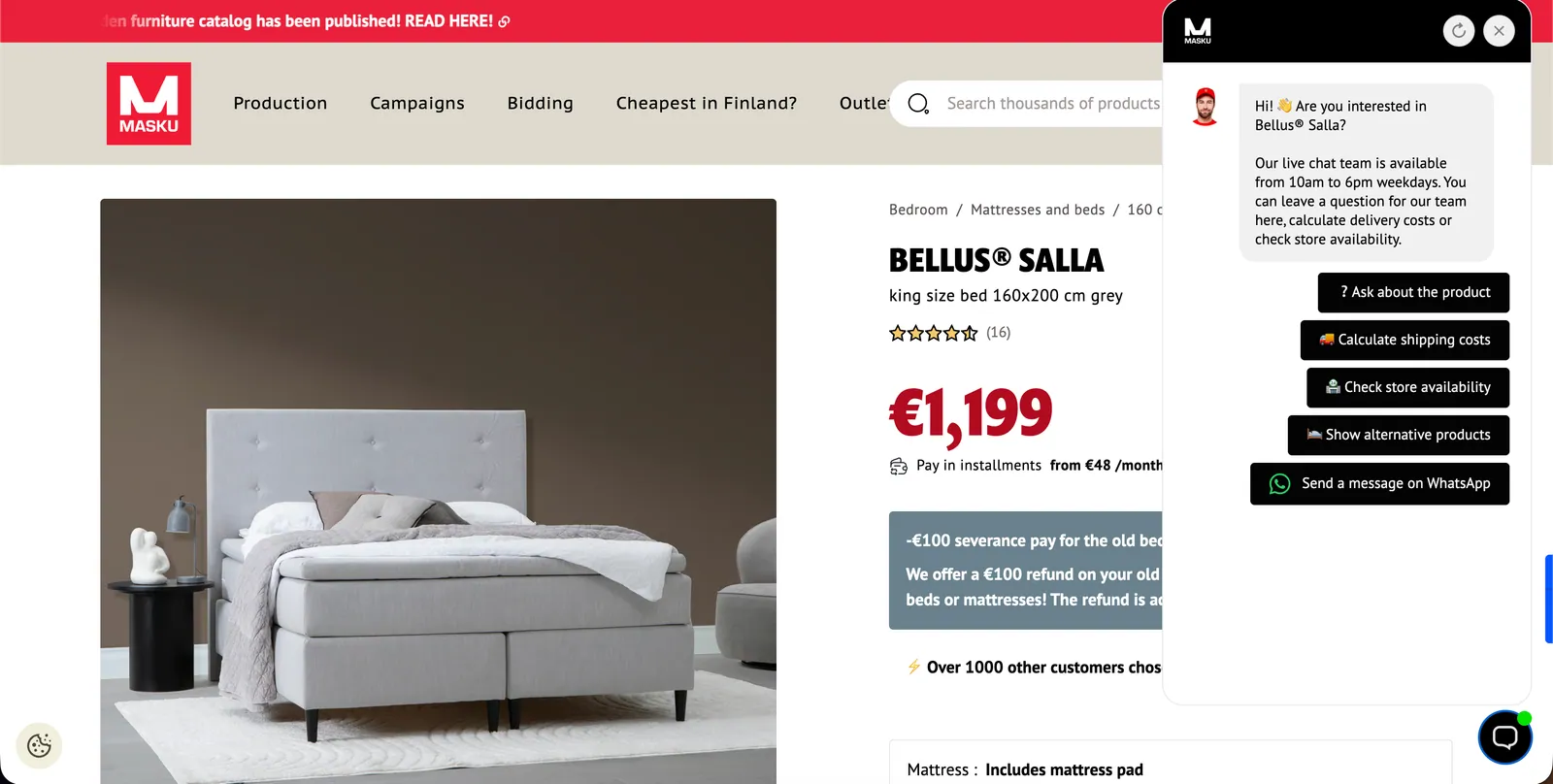
Read the full Masku ecommerce customer service case.
Shopify AI launch checklist
Before development
- Select one measurable use case.
- Name the owner for product, policy and support content.
- Map required Shopify data and minimum app scopes.
- Define prohibited answers and actions.
- Establish a baseline for the target metric.
Before launch
- Test real questions and edge cases.
- Verify customer authentication and data isolation.
- Confirm API version and webhook handling.
- Test handoff on desktop and mobile.
- Add consent, privacy and retention controls appropriate to your market.
After launch
- Review a sample of answers for accuracy.
- Track escalation reasons and unresolved intents.
- Repair source data before expanding scope.
- Compare performance with the baseline or control.
- Recheck permissions and supported API versions regularly.
Frequently asked questions about AI for Shopify
Does Shopify include AI product search?
Shopify provides native storefront search and the Search & Discovery app for filters, synonyms, product boosts and recommendations. Whether you need another layer depends on your catalogue and shopper queries. Test native search first, then evaluate conversational search against actual no-result and low-conversion queries.
Can an AI assistant show Shopify order status?
Yes, if it is connected to the relevant order or shipment data and the customer is authenticated appropriately. Use narrow API permissions, prevent cross-customer access and avoid placing protected order data in a public knowledge base.
Should AI be allowed to cancel or change orders?
Not by default. Begin with read-only guidance and authenticated self-service. Add write actions only after you have confirmation steps, audit logs, failure handling and clear ownership.
How long does a Shopify AI implementation take?
The honest answer depends on scope and data quality. A product FAQ pilot is smaller than authenticated order tracking across several systems. Estimate the project after mapping sources, permissions, actions, test cases and handoff requirements.
How do I calculate Shopify AI ROI?
Use actual store inputs and separate cost savings from incremental gross profit. Include software, integration, content maintenance and quality review. Model conservative, expected and ambitious cases in the ecommerce ROI calculator.
What to do next
Start with one high-volume intent and prove that answers are accurate before adding more actions. If the challenge is product discovery, continue with the AI product search guide. If you are prioritising investments across the whole customer journey, use the broader AI for commerce strategy guide.